
Book a Free Call
No commitment required
Software development has been transitioning from a world of isolated tools toward a more integrated ecosystem where AI agents can access and manipulate context across systems in real time.
For teams building user-facing applications, that evolution addresses an expensive problem. Modern interfaces are rarely built from a single source of truth. Design decisions live in Figma. Components live in a codebase. Design tokens live somewhere else. Product requirements evolve in tickets and documentation. Keeping those systems aligned has usually required a significant amount of human translation.
That translation layer creates friction everywhere. Engineers spend time inspecting layouts, validating design decisions, mapping designs to components, and reconstructing intent that already exists somewhere else in the organization. The problem isn’t that the information is unavailable. The problem is that it is fragmented across tools.
The introduction of Model Context Protocol (MCP) servers in November 2024 represents a significant step toward solving that fragmentation. For the UI layer of modern applications, AI coding assistants can now connect directly to design tools like Figma and retrieve structured information instead of relying on screenshots or pasted descriptions.
In this post, we’ll explore how the Figma MCP is changing the workflow of UI implementation, why context matters more than generation, and what frontend engineering looks like when the boundary between design systems and application code starts to disappear.
For years, turning designs into working software meant navigating the gap between design intent and production reality. A designer would create a Figma file. Engineers would inspect spacing manually, interpret responsive behavior from static frames, recreate typography rules, and make assumptions about interactions that weren’t fully documented. Even in mature engineering organizations, a surprising amount of UI work was still interpretation work. As the design team at Cash App put it, the traditional handoff model often felt like final screens and assets had to be “tossed over a fence for developers to catch.” [1]
The challenge was rarely a lack of tooling. The challenge was that design intent, implementation constraints, responsive behavior, and interaction logic often lived in different places, leaving engineers responsible for bridging the gap between them.
You’d constantly move between tools trying to reconstruct intent from static information…
Model Context Protocol (MCP), introduced by Anthropic, is an open protocol designed to standardize how AI systems interact with external tools and data sources. The important idea behind MCP is that models stop operating as isolated text generators and start behaving more like runtime participants inside real engineering environments.
Instead of embedding every integration directly into the model layer, MCP creates a structured interface where agents can retrieve external context dynamically. In practice, that means an AI coding assistant can query systems like Figma, local repositories, databases, APIs, or internal tooling while reasoning through implementation tasks.
For UI workflows, that changes a lot. A design is no longer just an image attached to a prompt. It becomes navigable context.
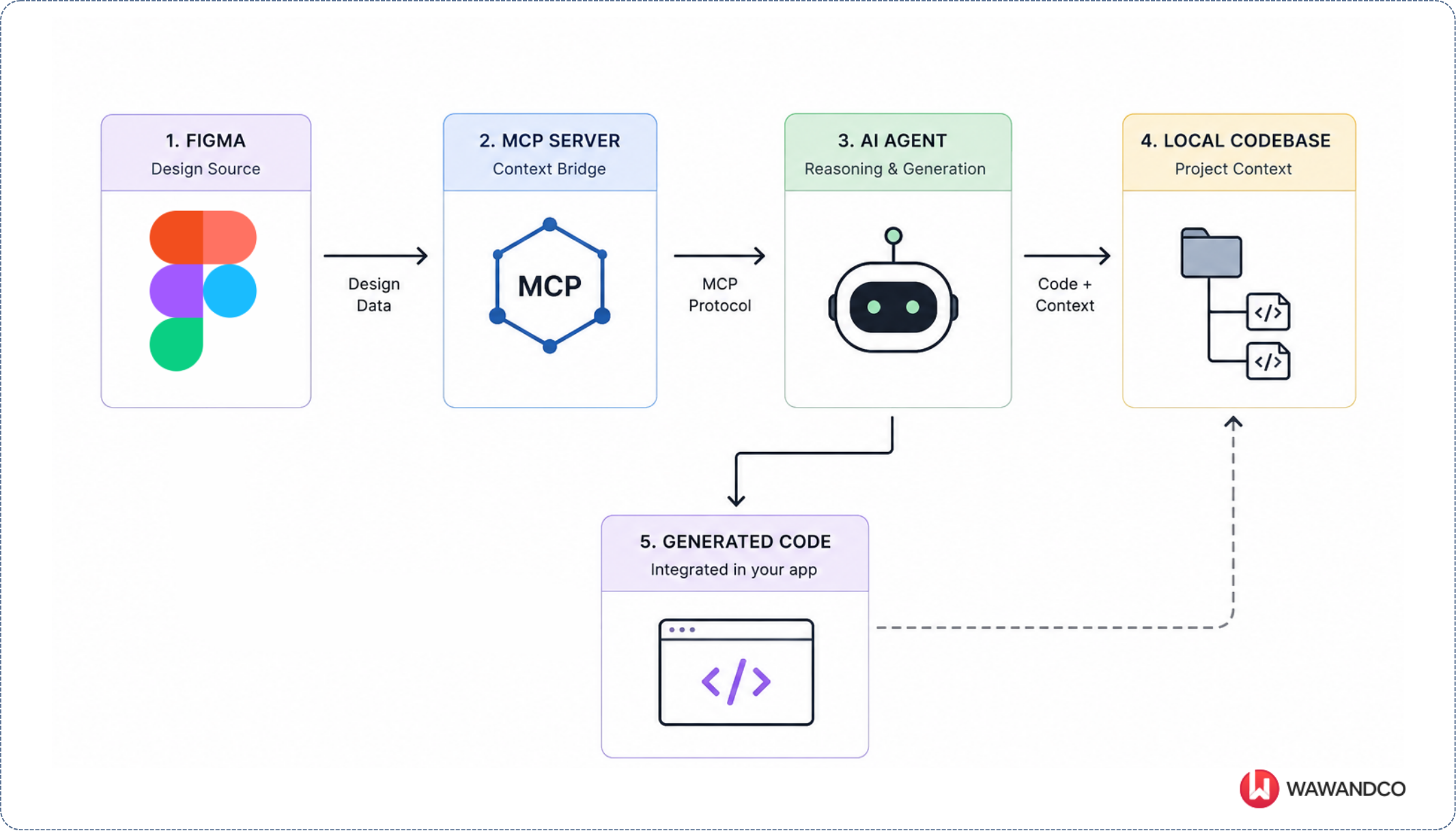
When an agent can retrieve component metadata directly from Figma — things like spacing values, semantic color tokens, layout constraints, or reusable component references — implementation becomes more grounded in the actual system behind the interface.
That distinction matters because most UI complexity doesn’t live in the pixels themselves. It lives in the relationships between systems.
One common misconception about Figma-powered AI workflows is that the design tool somehow understands your implementation stack. It doesn’t.
Figma doesn’t know whether your application uses Tailwind, CSS Modules, Styled Components, or a custom component library. It doesn’t know your repository structure, architectural conventions, or which abstractions already exist in production.
What Figma knows is design intent.
A component might specify that it uses a semantic spacing token, a typography style, and a surface color. Through MCP, an AI agent can retrieve that information in a structured format:
{
  "Primary/900": "#101828",
  "Text sm/Medium": "Font(family: Inter, style: Medium, size: 14, weight: 500, lineHeight: 100, letterSpacing: 0)",
  "Spacing/xs": "4",
  "Spacing/sm": "8",
  "Padding/button-sm": "8 14",
  "Padding/input":     "8 12",
  "Margin/section-gap": "48",
  "Border/radius-sm": "4",
  "Border/color-default":  "#D0D5DD",
  "Opacity/disabled": "0.4"
}
What’s important here is that these aren’t implementation details. They’re design abstractions.
The design system may define that Spacing/sm represents 8 pixels and that Border/radius-sm represents a 4-pixel corner radius, but nothing in that information says how those concepts should be implemented in code. That’s where repository context becomes critical.
An AI agent like Claude Code can inspect the codebase and discover an existing Card component that already implements the same spacing, radius, and surface conventions. In another project, it might find a Tailwind-based implementation. In a third, it might discover a custom design system built on top of reusable primitives.
The agent’s job is not simply to convert design tokens into code. Its job is to reconcile design intent with implementation intent. This is one of the most important shifts introduced by MCP-based workflows. The value doesn’t come from giving AI access to Figma. The value comes from allowing AI to combine multiple sources of truth simultaneously: design systems, repositories, component libraries, and application architecture.
In that sense, MCP is less about design-to-code generation and more about context fusion. And context fusion is where implementation starts becoming more reliable than traditional screenshot-based workflows.
One of the most interesting aspects of this workflow is how little infrastructure is required to get started. Rather than building a custom MCP server, Figma now provides an official MCP server that can be connected directly to compatible clients such as Claude Code and Visual Studio Code. The entire setup can be completed in a few minutes.
You can register the Figma MCP server directly with your AI client.
For Claude Code:
claude plugin install figma@claude-plugins-official
Or through the Claude configuration file:
{
  "mcpServers": {
    "figma": {
      "url": "https://mcp.figma.com/mcp"
    }
  }
}
Visual Studio Code follows a similar process through its MCP configuration settings.
The first time the agent tries to use the server, it opens a browser window with Figma’s OAuth flow. You log in with your Figma account and click “Allow access” to authorize the connection — no manual token generation or copying required.
After authentication, the agent gains access to the resources exposed by the Figma project. This includes component hierarchies, design variables, layout metadata, frame structures, typography definitions, and design system information.
> /mcp
▔▔▔▔▔▔▔▔▔▔▔▔▔▔▔▔▔▔▔▔▔▔▔▔▔▔▔▔▔▔▔▔▔▔▔▔▔▔▔▔▔▔▔▔▔▔▔▔
   Manage MCP servers
   2 servers
     claude.ai

     Built-in MCPs (always available)
   ❯ plugin:figma:figma · ✔ connected · 19 tools

   https://code.claude.com/docs/en/mcp for help
At this point, the workflow changes significantly.
Instead of manually exporting screenshots and describing layouts, the agent can retrieve information directly from the design system itself.
For example:
Open the Pricing Page from Figma.

Before generating anything, look at how this repository is
structured: which framework it uses and how components are
organized.

Once you understand the conventions, implement the pricing page
using the design tokens from Figma, but follow this project's existing
patterns instead of generic defaults.

Place the new page in the main pages folder.
Behind the scenes, the agent can make tool calls against the MCP server to retrieve structured information about the design:
{
  "tool": "get_variable_defs",
  "arguments": {
    "fileKey": "<PRICING_PAGE_FILE_KEY>",
    "nodeId": "<PRICING_PAGE_NODE_ID>"
  }
}
Response:
{
  "Primary/900": "#101828",
  "Text sm/Medium": "Font(family: \"Inter\", style: Medium, size: 14, weight: 500, lineHeight: 100, letterSpacing: 0)",
  "Spacing/xs": "4",
  "Padding/button-sm": "8 14",
  "Padding/input":     "8 12",
  "Margin/stack-md":    "16",
  "Border/radius-sm": "4",
  "Border/width-default": "1",
  "Opacity/disabled": "0.4",
  "Opacity/overlay":  "0.6",
  ...
}
Figma MCP returns raw unitless numbers. What the AI code assistant does with them depends on the stack.
Tailwind — map to config scale:
// tailwind.config.js
spacing: {
  'xs': '4px',   // or 1 (uses Tailwind's 4px base unit = 0.25rem)
  'sm': '8px',   // or 2
  'md': '16px',  // or 4
  'lg': '24px',  // or 6
}
CSS vars — straight px:
--spacing-md: 16px;
--spacing-lg: 24px;
Rem-based — divide by 16:
--spacing-md: 1rem;   /* 16/16 */
--spacing-lg: 1.5rem; /* 24/16 */
The token value 16 is just a number. Context (framework, base font size, design system conventions) determines the unit.
What makes this particularly powerful is that the connection is scoped to a real project. The agent isn’t working from generic UI patterns or screenshots. It’s operating against the same design system, variables, and component definitions used by the product team.
That distinction becomes important later when we look at how design intent gets combined with repository context to produce implementation decisions.
To make this concrete, here is what a single-page implementation session looks like. Using Claude Code with the Figma MCP, we built a full dashboard table view — navigation, filter bar, data table with status indicators and badges, and footer — from a Figma node to working code in minutes.

The single most expensive step was the get_design_context call, which returned roughly 9,200 tokens of structured design data: the full component hierarchy, exact hex color tokens, typography scales, spacing values, hardcoded content, and a screenshot for visual reference. That one call replaced an entire manual inspection session — no color picker, no ruler, no guessing font weights.
The generated code accounted for approximately 3,100 output tokens. The session also read existing codebase files to match repository conventions rather than emit generic patterns. The figma-use skill documentation loaded at session start cost an additional ~6,800 tokens on cache write.
| Component | Tokens | Cost (approx) |
|---|---|---|
get_design_context response |
~9,200 input | $0.028 |
| figma-use skill doc (cache write) | ~6,800 | $0.007 |
| Codebase file reads | ~2,000 input | $0.006 |
| Generated code (output) | ~3,100 output | $0.047 |
| Total (excluding cache reads) | ~$0.09 |
Cache reads are excluded: they vary by session length and conversation history, and would add $0.05–$0.15 on top depending on how long the session runs.
What is verifiable: one MCP call, one screenshot, zero manual design inspection, and generated code that required minimal adjustments to match the existing design token system.
A screenshot-only workflow tends to produce shallow code. Context-aware workflows produce systems-aware implementations.
That difference becomes obvious very quickly in production environments. A context-aware agent can potentially reuse existing components correctly, align implementation with design tokens, preserve accessibility patterns, and follow repository conventions already established by the engineering team.
Without those constraints, generated code becomes entropy. This is where many “AI-generated UI” demos quietly break down. They optimize for visual similarity. Production systems optimize for maintainability. Those are not the same thing.
And the faster generation becomes, the more dangerous shallow abstractions can become over time.
| Shallow generated UI | System-aware implementation | |
|---|---|---|
| Source of truth | Pixels in a screenshot | Design tokens + repo context |
| Components | Recreated, often duplicated | Existing components reused |
| Design tokens | Hardcoded, drift over time | Referenced from the system |
| Accessibility | Inconsistent across screens | Patterns preserved from repo |
| Conventions | Generic, framework-agnostic | Aligned with existing codebase |
| Outcome | Entropy: drift compounds with velocity | Coherence: system scales with velocity |
There’s also a real architectural risk emerging underneath these workflows.
As implementation speed increases, teams can fragment UI systems faster than before. Duplicate components appear more easily. Design tokens drift. Similar abstractions get recreated instead of reused. Accessibility patterns become inconsistent. UI layers multiply faster than architectural governance evolves around them.
The danger isn’t that AI generates bad code. The danger is that teams stop noticing when system coherence starts degrading because the velocity gains feel so impressive in the short term.
Implementation speed creates the illusion that architecture is scaling alongside it. Sometimes it isn’t.
UI engineering is changing from manually translating interfaces toward orchestrating systems.
That doesn’t reduce the importance of engineers. If anything, it increases the importance of engineering judgment. Because once implementation friction decreases, the differentiator becomes the ability to govern complexity over time.
The interesting question is no longer whether AI can generate production UI from Figma. It already can. The real question is what engineering organizations become once interface translation is no longer the primary bottleneck.
At Wawandco, a lot of our work happens inside fast-moving product teams already adapting to AI-assisted engineering workflows. What’s becoming clear is that the challenge is no longer just accelerating implementation. It’s making sure the systems behind that implementation remain coherent as development speed continues to increase.