
Book a Free Call
No commitment required

Ever had a database migration fail in production because an environment was out of sync? Traditional, imperative SQL scripts are a common cause of this pain—they’re brittle, hard to track, and often lead to environment drift. While we’ve embraced declarative tools like Terraform and Kubernetes for our infrastructure, our databases have often been left behind. Atlas, an open-source tool built in Go, changes that. It introduces a declarative workflow, letting engineers treat schemas as code with the same rigor as application logic. This post explores how Atlas transforms database management for Go applications, enabling teams to ship faster with greater confidence.
Traditional database migrations rely on a sequence of SQL scripts: 2025001_create_users.sql, 2025002_add_X_column_to_users.sql, and so on. These are imperative instructions. Their behavior depends on the state of the target database—leading to drift when environments fall out of sync. Declarative workflows solve this by making the desired schema state the source of truth. It inspects the live database, compares it with the declared schema, and generates the SQL needed to reconcile the difference.
This subtle shift—what vs. how—has massive engineering benefits:
But the true power for Go developers lies in its programmability. Atlas isn’t just a CLI; its core logic is exposed through packages like ariga.io/atlas/sql/schema and ariga.io/atlas/sql/migrate. Imagine building a multi-tenant SaaS application where you can programmatically create and apply a new tenant’s schema on-the-fly, directly from your Go code, every time a new customer signs up. This transforms schema management from a manual DevOps task into an automated, integrated feature of your application.
Let’s explore how to leverage Atlas for managing database schemas declaratively.
Schemas are written in HCL or SQL, making them easy to read and version. Let’s define an example with a teams table in HCL for an SQLite database:
// schema.hcl
schema "main" {}
table "teams" {
  schema = schema.main
  column "id" {
    type = integer
    null = false
    auto_increment = true
  }
  column "name" {
    type = text
  }
  primary_key {
    columns = [column.id]
  }
}
This schema becomes the single source of truth within our code. Any deviation in testing environments or production is automatically detected by Atlas.
Atlas generates migration plans by comparing the declared schema against the live database. At this stage, Atlas doesn’t touch the database directly. Instead, it generates a plan showing exactly what changes would be required.
This allows teams to inspect the proposed SQL, understand the impact, and decide when to apply it.

It produces an SQL migration script that can be reviewed before applying. This ensures transparency and control over changes. If something looks off, we can halt the process before any changes are made.
When the schema evolves, Atlas recalculates the difference between the current and desired state, automatically generating the necessary statements. The visualization below shows how these updates are transformed into safe and auditable operations.
For example, if we want to add a new founded_at column to the teams table, we simply update our HCL schema:
// schema.hcl
table "teams" {
  schema = schema.main
  column "id" {
    type = integer
    null = false
    auto_increment = true
  }
  column "name" {
    type = text
  }
  column "founded_at" {  // New column
    type = datetime
    null = true
  }
  primary_key {
    columns = [column.id]
  }
}
Atlas detects this addition and generates the appropriate ALTER TABLE statement. It also checks for potential data loss or unsafe operations, prompting for confirmation if necessary. No new migration files are needed; the desired state is all that matters.

With this process, even frequent changes—such as adding columns, indexes, or constraints—follow a predictable path, minimizing surprises in production.
For teams with existing SQL migrations, Atlas can introspect the current database state and generate an initial declarative schema. From there, future changes can be managed declaratively. This hybrid approach eases the transition without losing historical context.
Here is how to introspect an existing SQLite database:
atlas schema inspect "sqlite3://path/to/database.db" > schema.hcl
This command generates the HCL schema file based on the current state of the database. The result of this will be a file similar to the one shown above, which can then be used as the basis for future declarative schema management.
Even for complex schemas, Atlas handles the intricacies of relationships, indexes, and constraints, ensuring that the generated schema accurately reflects the live database. Or if we have multiple schemas, we can manage them all within a single HCL file.
Checkout how to inspect multiple schemas from a PostgreSQL database:
atlas schema inspect -u "postgres://localhost:5432/database?sslmode=disable" --schema schema1 --schema schema2
Atlas can also generate an Entity Relationship Diagram (ERD) from the inspected schemas, allowing us to review the structure visually. This is particularly useful for understanding complex relationships and ensuring the schema aligns with application needs:
atlas schema inspect -u "postgres://postgres:pass@localhost:5432/database?sslmode=disable" --web
Here is an example using our created SQLite database:
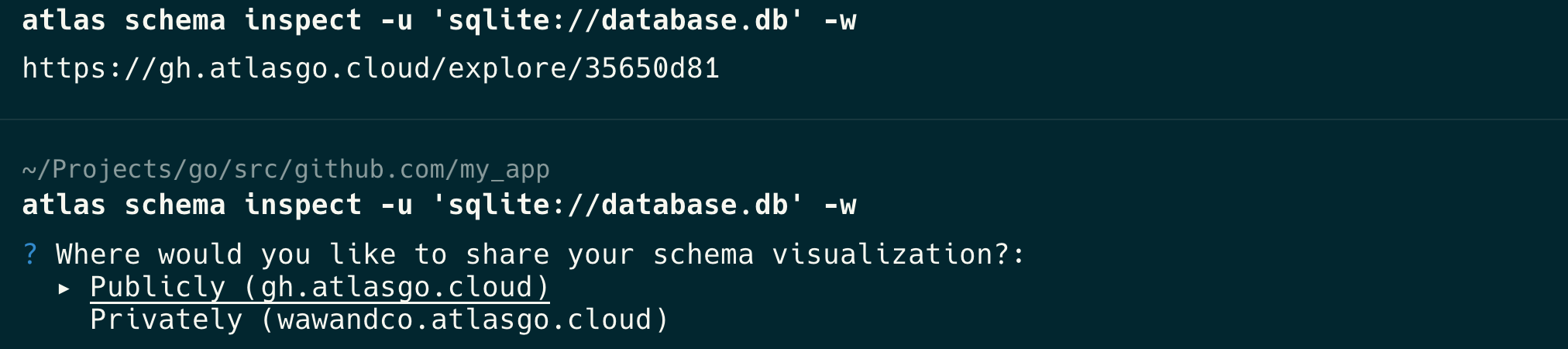
Once we choose where to visualize our database schema, Atlas opens a browser window displaying the ERD.

Atlas really shines when integrated into everyday development. Instead of manually running SQL scripts or relying on developers to remember the new migrations order, Atlas can also be embedded directly into CI/CD pipelines.
For example, a GitHub Action or GitLab CI job can be configured adding a step to validate schema changes on pull requests:
# .giuthub/workflows/validate-schema.yml
- name: Validate SQLite schema
  run: |
    touch database.db
    atlas schema apply \
      --url "sqlite://database.db" \
      --to "file://internal/migrations" \
      --dry-run \
      --dev-url "sqlite://file?mode=memory"
This step validates that the database schema defined in the pull request fully matches the intended or expected state of the system. If any discrepancies or differences are detected between the schema in the PR and the reference migrations, the pipeline will fail, effectively preventing accidental drift, unintended modifications, or unsafe schema changes from being applied to production.
By treating schema changes like code reviews, teams enforce consistency and reduce the chance of late-stage surprises.
In larger teams, multiple developers may work on schema changes simultaneously. Atlas’s declarative approach simplifies collaboration. Each developer works on their own branch, updating the shared schema file. When changes are merged, Atlas reconciles them, generating a single migration plan that reflects all updates.
This approach avoids the common pitfalls of conflicting migrations or out-of-order scripts. Teams can also maintain separate schema files for different environments (development, staging, production), ensuring that each environment evolves in a controlled manner.
Adopting a declarative workflow for database schemas aligns with modern DevOps practices. It emphasizes automation, repeatability, and safety—key tenets for high-velocity teams. By managing schemas as code, teams can:
Declarative infrastructure principles can bring significant benefits to database schema management. By treating schemas as code, teams can manage changes safely, predictably, and collaboratively. Tools like Atlas exemplify this approach, enabling versioned, reproducible, and auditable schema changes that reduce risk and prevent drift. Whether starting new projects or migrating from imperative SQL migrations, adopting declarative practices provides a clear path to more reliable and efficient database evolution. Embracing this mindset can lead to faster feature delivery and greater confidence in database changes.